Manage DLMM positions: out of range, claim, rebalance, close
Out of range on Meteora DLMM? Learn when to claim fees, add liquidity, rebalance, zap out or close — with a simple decision guide.
- Check positions regularly; out of range means you have stopped earning.
- Claim fees whenever it is worth the network fee.
- Rebalance when price has moved and you still like the pool.
- Close (or Zap Out) when volume dies or your exit rule triggers.
Opening a position is the easy part. The money is made — or saved — in how you manage it.
Know the three states
- 🟢 In range — earning. Leave it, maybe claim fees.
- 🟠 Out of range above — you hold SOL. Not earning.
- 🔴 Out of range below — you hold the token. Not earning.
MeteMate shows the state on every position row and can alert you when a position leaves its range.
Claim fees
Fees pile up inside the position. Claim them from My Pools or the pool page. Claiming costs a network fee, so let them build up a bit first. Closing a position claims everything automatically.
Add liquidity
Still in range and the pool is still paying? You can add more to the same position — the amount is spread over your existing bins.
Rebalance
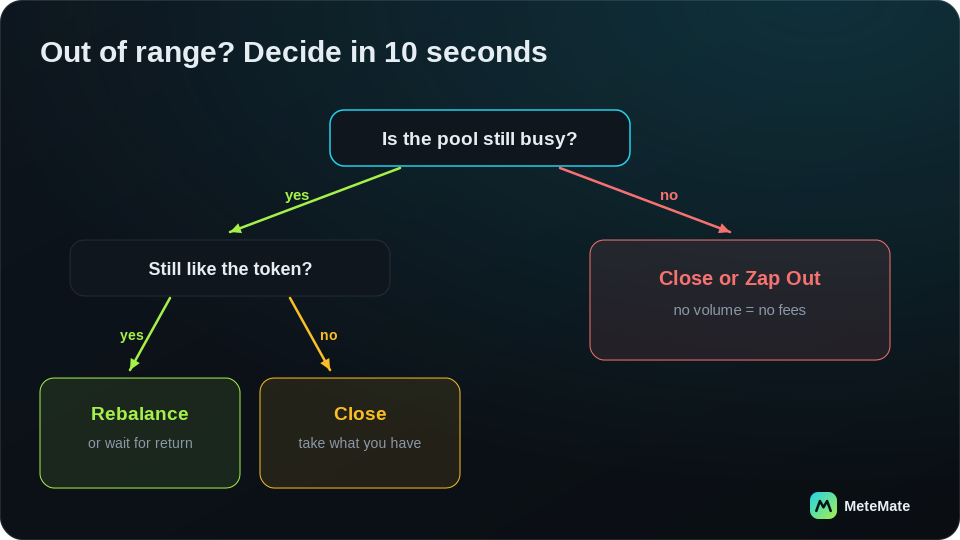
Price ran away from your range but the pool is still busy? ⟲ Rebalance closes the position and opens a new one with the same width around the current price — two approvals in your wallet. You lock in any impermanent loss, so only do it if you believe the new range will earn.
Close or Zap Out
Close withdraws everything, claims fees and returns the position rent. Zap Out also swaps everything to one token (usually SOL) so you end up with a single clean balance.
A simple routine
- Open My Pools a few times a day (or set alerts).
- For each position ask: in range? Volume still good? Does my exit rule say leave?
- In range and busy → leave it. Out of range and busy → rebalance or wait. Volume dead → close.
- Claim fees when they are worth more than a few network fees.
✅ Quick check
1. Your position is out of range below. What do you hold?
2. Volume on the pool has dried up and you are out of range. Sensible move?
3. What does Zap Out add on top of Close?
Questions people ask
What should I do when my DLMM position is out of range?
Decide whether the pool is still worth it. If volume is strong, rebalance to a new range around the current price or wait for price to return. If volume has died, close or zap out.
Does closing a DLMM position return my rent?
Yes. Closing returns the refundable position rent along with your tokens and any unclaimed fees.
What is the difference between Close and Zap Out?
Close returns both tokens as they are in the position. Zap Out also swaps them into one token, usually SOL.